背景
一台物理机重启后,网卡驱动probe失败了,导致系统起来后不通网
已知:cmdline添加iommu=pt intel_iommu=on才会导致驱动probe失败,不添加这些参数,可以probe成功
排查
首先通过带外把该机器上的存在的所有内核(包括系统重启前没问题的内核)都启动了一下,发现都是probe网卡驱动失败,唯一一个成功的内核,就是cmdline中不添加iommu=pt intel_iommu=on参数的。
其次,找了一台同规格的机器对比下mlx驱动版本、mlx网卡固件版本等,排除了这些问题。
之前出过这种问题,厂商的反馈是升级mlx驱动,不过,看上去并不是这个原因。因为其他机器都没问题。
之前出这个问题的时候,换了一块网卡就好了。现在,保修换了一块网卡,还是没有解决。因此,mlx网卡硬件并没有问题,需要看看到底什么引起了这个问题。
看一下log
[   37.464510] Compat-mlnx-ofed backport release: f3bf963
[   37.469645] Backport based on mlnx_ofed/mlnx-ofa_kernel-4.0.git f3bf963
[   37.476257] compat.git: mlnx_ofed/mlnx-ofa_kernel-4.0.git
[   37.502684] mlx5_core 0000:31:00.0: firmware version: XXXXX
[   37.508723] mlx5_core 0000:31:00.0: 63.008 Gb/s available PCIe bandwidth (8 GT/s x8 link)
[   37.516912] mlx5_core 0000:31:00.0: mlx5_function_setup:1283:(pid 5): Failed initializing command interface, aborting
[   37.527513] mlx5_core 0000:31:00.0: probe_one:1961:(pid 5): mlx5_init_one failed with error code -12
[   37.536789] mlx5_core: probe of 0000:31:00.0 failed with error -12
[   37.543697] mlx5_core 0000:31:00.1: firmware version: XXXXX
[   37.549728] mlx5_core 0000:31:00.1: 63.008 Gb/s available PCIe bandwidth (8 GT/s x8 link)
[   37.557910] mlx5_core 0000:31:00.1: mlx5_function_setup:1283:(pid 5): Failed initializing command interface, aborting
[   37.568506] mlx5_core 0000:31:00.1: probe_one:1961:(pid 5): mlx5_init_one failed with error code -12
[   37.577700] mlx5_core: probe of 0000:31:00.1 failed with error -12
返回-12,也就是ENOMEM,内存不足?
检查一下dmidecode是不是有掉内存呢?没有。
把我们的hugetlb预留的大页减少一部分,还是不行。
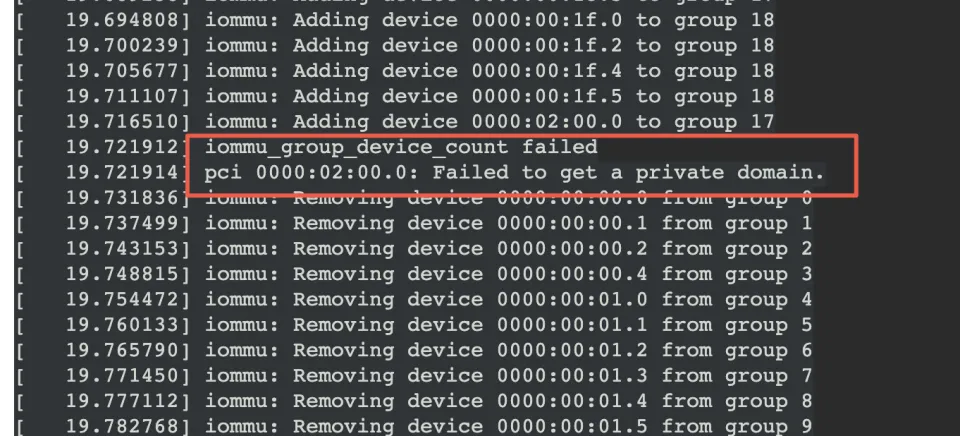
再看一下异常机器的log,发现了这里的报错,再结合只有cmdline中添加iommu=pt intel_iommu=on才会报错这个因素,怀疑是这里报错最终导致mlx驱动probe失败?
start_kernel
    ->mm_init
        ->mem_init
            ->pci_iommu_alloc
                ->detect_intel_iommu
                    ->drivers/iommu/dmar.c:x86_init.iommu.iommu_init = intel_iommu_init
                        ->intel_iommu_init
                            ->bus_set_iommu
                                ->iommu_bus_init
                                    ->add_iommu_group
                                        ->.add_device(iommu ops)
                                           ->intel_iommu_add_device
                                               ->iommu_request_dma_domain_for_dev(传IOMMU_DOMAIN_IDENTITY,iommu直接映射)/iommu_request_dm_for_dev(传IOMMU_DOMAIN_DMA,不能被iommu直接映射)
                                                  ->request_default_domain_for_dev
static int intel_iommu_add_device(struct device *dev)
{
        struct dmar_domain *dmar_domain;
        struct iommu_domain *domain;
        struct intel_iommu *iommu;
        struct iommu_group *group;
        u8 bus, devfn;
        int ret;
............
        if (domain->type == IOMMU_DOMAIN_DMA) {
                if (device_def_domain_type(dev) == IOMMU_DOMAIN_IDENTITY) {
                        ret = iommu_request_dm_for_dev(dev);
                        if (ret) {
                                dmar_domain->flags |= DOMAIN_FLAG_LOSE_CHILDREN;
                                domain_add_dev_info(si_domain, dev);
                                dev_info(dev,
                                        "Device uses a private identity domain.\n");
                                return 0;
                        }

                        return -ENODEV;
                }
        } else {
                if (device_def_domain_type(dev) == IOMMU_DOMAIN_DMA) {
                        ret = iommu_request_dma_domain_for_dev(dev);
                        if (ret) {
                                dmar_domain->flags |= DOMAIN_FLAG_LOSE_CHILDREN;
                                if (!get_private_domain_for_dev(dev)) {
                                        dev_warn(dev,
                                                "Failed to get a private domain.\n");
                                        return -ENOMEM;
                                }

                                dev_info(dev,
                                        "Device uses a private dma domain.\n");
                                return 0;
看log可以轻易知道,这里走的是else这个分支。所以,当前domain是Identity类型,但是这个设备却是需要申请DMA类型的domain,然后还失败了,返回ENOMEM
首先,从其他正常机器上我们可以看到,当前domain是Identity类型,但是这个设备却是需要申请DMA类型的domain,这个是正常的。区别就在于,正常机器上get_private_domain_for_dev成功了,但是在异常机器上失败了。
看log,异常机器上因为对02:00.0 add_device的过程中失败了,所以触发了回滚,把之前成功add device的设备也都从iommu group中remove了。这样一来,mlx网卡肯定就不再iommu group中了(甚至都还没到都把mlx网卡从iommu group中remove那一步)
然后再看mlx驱动probe失败的log,查找代码中能返回ENOMEM的地方。最终,只发现了一处可疑点。
alloc_cmd_page
	->dma_alloc_coherent
		->dma_alloc_attrs
			->对应ops的alloc,启用iommu的情况下就是intel_alloc_coherent


 const struct dma_map_ops intel_dma_ops = {
        .alloc = intel_alloc_coherent,
应该就是在这里,因为之前的iommu_group中add device失败,把group domain这些的device都释放了,然而mlx驱动probe的过程中会调用iommu的ops注册的DMA api去申请内存,所以失败了。
所以,到此,网卡驱动probe失败的原因我们清楚了。我们启用了inte_iommu=on+iommu=pt,但是在iommu group中add device 02:00.0的时候失败了,所以就回滚把所有的设备从iommu group中remove了,mlx网卡也不例外,然后probe mlx驱动的时候需要使用dma api分配一些页面,也就是使用intel_alloc_coherent(因为开启了inte_iommu=on+iommu=pt),不过,因为之前一些错误把所有的设备从iommu group中释放了,这里的alloc也就理所当然的失败了
然后后面再看,为什么02:00.0加错了iommu group了呢?
再看一下dmesg中iommu add device的log,发现
[   19.665858] iommu: Adding device 0000:00:1c.0 to group 17
[   19.671296] iommu: Adding device 0000:00:1c.5 to group 17
在正常机器上,这俩是放到了不同的group中,这俩是什么呢?

两个pci bridge。
这俩在正常机器上为什么被放到了不同的iommu group下?
原来,正常机器上的0000:00:1c.5是由ACS能力的,但是与异常机器上,ACS丢了
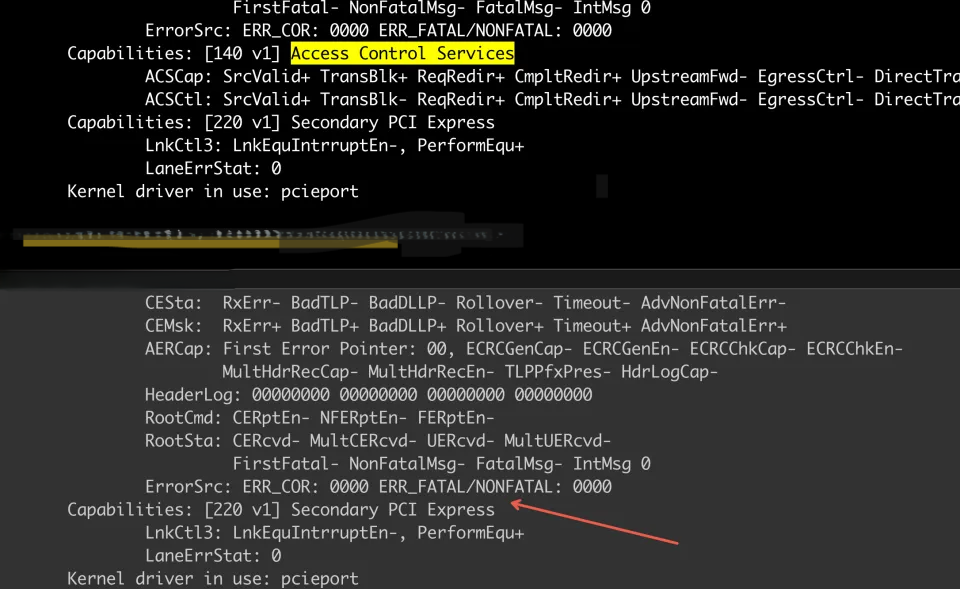
可能是异常机器的bios版本有问题或者主板上的这个pci bridge坏掉了。
转载请注明来源,欢迎对文章中的引用来源进行考证,欢迎指出任何有错误或不够清晰的表达。可以在下面评论区评论,也可以邮件至 857879363@qq.com